Game Rules
As mentioned in the intro, the game is heavily inspired by the game of Quoridor. The basic game rules are more or less the same. See the wikipedia page on Quoridor for background. The game rules are enforced by the system.
note
Any visual information given here, including the example boards, are based on the CLI version of the game
Game board
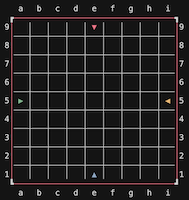
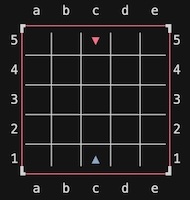
Corridor Quest is played on a game board consisting of squares and edges between these squares. The game board can be a different size for each game but width and heigh are always the same. Valid board sizes are 5, 7, 9, 11, 13, 15 and 17 with the default being 9. The coordinate system is chess notation. So, d3 means the square at column 'd', row '3'. The game board’s orientation is the same for everyone. The color of the board’s outer edge is to indicate the player who’s turn it is (see later)
Pawns
Each player is represented by a pawn which begins at the center square of one edge of the board. As a board always has 4 edges, a maximum of 4 players can play a game. However, it is also possible to play a 2 player game in which case the players always start at opposite sides (north and south). Pawns are color coded and use triangle shaped icons to represent direction and distinction for those that have trouble with colors.
note
Although, in theory, a 3 player is possible, it is not implemented as it gives unequal chances to the 3rd player.
Objective
The objective is to be the first player to get your pawn to any space on the opposite side of the game board from which you begin. The triangle shape of the pawn is a great hint to where its goal is. So, if your pawn is North you win when you are the first player to place your pawn on any of the squares on the most southern row of the board.
Walls
A wall is an object that can be placed between squares with the purpose of blocking a pawn's ability to move between those squares. Each player gets an initial amount of walls assigned to place them on the board. The exact initial amount depends on the board-size chosen when a new game is started. A wall has a length of 2 squares and can be placed either horizontally of vertically, but must stay fully on the board.
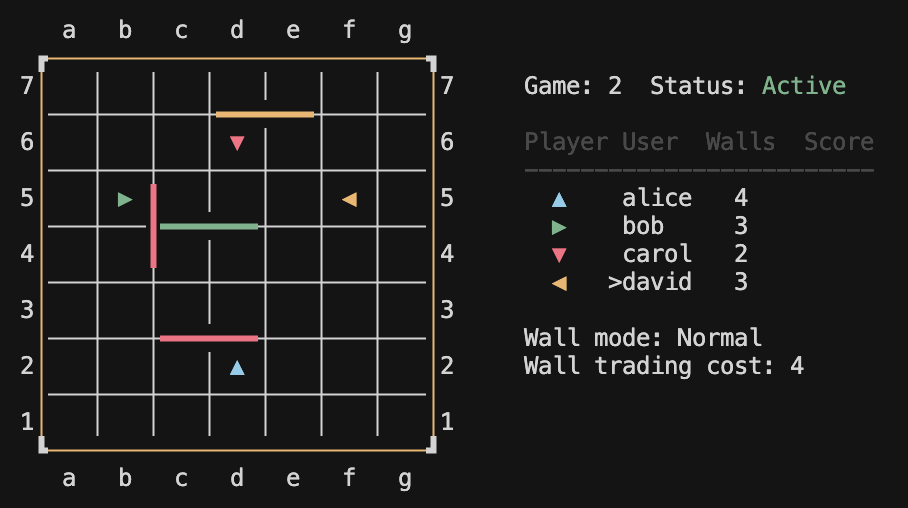
A wall coordinate also follows chess notation syntax, similar to the pawns. However a letter is added as a suffix to indicate the walls orientation: 'v' for vertical and 'h' for horizontal. For example, a wall placed at coordinate 'c3v' will be placed on the edges between squares 'c3', 'd3' and 'c4', 'd4'. The coordinate for a wall is the square that is closest to square 'a1'. Walls are, in the basic game mode, color coded in the same color as the pawn of a player. This means it is known during and after game play which player placed which wall, if any.
Walls have placement rules. A wall cannot be placed where another wall already is, either fully or partially. Also a horizontal wall cannot intersect a vertical wall. However, wall are allowed to align in any direction. The examples shown below give all ways walls are legally placed. One important rule is that the placement of a wall may never cause any player to be blocked from reaching its objective at the moment of placing. The system will validate all these rules before a wall placing is approved. Once a wall is placed it can neither be moved nor removed.
Move
A player can choose to move its pawn from one square to another square, but only in a strait line (north, east, south or west) and only one square per turn. The target square must be reachable:
- The edge between the current square and the target square must not have a wall placed in between.
- The target square must not be occupied by another player's pawn.

Jump
A player can jump 'over' another player's pawn if that pawns square is adjacent to the square of the players own pawn. One can only 'jump over a pawn' in a straight line (north, east, south, or west) if the path to the target square is unobstructed. This means:
- There is no wall placed on edges between the square where one's own pawn is and the square to jump to.
- The target square is not occupied by another pawn. You can only jump over a single pawn. If there are two pawns from opponents in a row you cannot jump over both.
- The target square is beyond the boards edge. You cannot jump over another pawn and end up outside the board.
Only if the jump path is obstructed is it allowed to jump diagonally, where the target square is on either side of the obstructing pawn and that square is not also obstructed by the same rules.
Finally and just to state the obvious: A player cannot jump over a wall.